I came across a twitter post linking to this article, https://hawksley.dev/blog/get-free-arpa-domain, and I read it purely out of curiosity. That is when I realised the .arpa domain is not actually available for registration like a normal domain. It is reserved for core internet infrastructure, not websites. You cannot go to a registrar and buy yourname.arpa the way you would buy yourname.com. But the article explained a loophole, and I decided to try it myself. Here is exactly what I did, in plain language, in case anyone else wants to try it.
Before getting into the how, it helps to know what .arpa actually is. According to Wikipedia, .arpa stands for "Address and Routing Parameter Area" and it is one of the original top level domains from way back in 1985, older than most of the domains people actually use today. It was originally meant to help the old ARPANET transition into the modern Domain Name System, and it was supposed to be temporary. But it turned out to be too useful to get rid of, mainly because part of it is used for something called "reverse DNS lookup," which is the system that lets computers figure out a domain name from an IP address, instead of the usual way around. IANA (the organization that manages domain infrastructure globally) says outright that .arpa is meant "exclusively for Internet-infrastructure purposes," and it is not open for public registration at all.
The part we care about is called ip6.arpa. This is the section used for reverse lookups of IPv6 addresses. Nothing about the DNS system technically stops you from pointing an ip6.arpa address at a real website too, even though that is obviously not what it was designed for. That is the loophole this whole project is built around.
To get an ip6.arpa address, you first need to actually own a slice of the IPv6 address space, or at least be delegated one. The easiest free way to do this is through a service called Hurricane Electric, using their site called tunnelbroker.net. This service exists to give people IPv6 connectivity over an existing IPv4 connection, using something called a "tunnel." Signing up is free and does not really check anything you type in, so you can use made up details if you want.
Once your account is verified, you go to "Create Regular Tunnel." It will ask for an IPv4 address for your side of the tunnel. Here is the funny part: it does not actually check if you own that address. It only checks that the address responds to a ping. So you can literally ping a random website's server and use that IP. Older websites without heavy CDN protection (like Cloudflare or Google's infrastructure) tend to work better here, since CDN protected addresses often get rejected by the form.
Once the tunnel is created, Hurricane Electric gives you something called a "Routed /64" prefix. This is your own personal block of IPv6 addresses, and it is the key ingredient for the next step.
This step is just a formatting exercise, but it is important to get right. Reverse DNS names are basically your IP address written backwards, one character at a time, separated by dots, with ".ip6.arpa" stuck on the end. Here is the process:
1. Take your prefix, for example 2001:470:d:e89::/64, and pad every group so it has exactly four characters, using leading zeros. That turns it into 2001:0470:000d:0e89.
2. Split every single character apart and put dots between them.
3. Reverse the entire order of the characters.
4. Add ".ip6.arpa" to the end.
So a prefix like 2001:0470:000d:0e89 becomes something like 9.8.e.0.d.0.0.0.0.7.4.0.1.0.0.2.ip6.arpa. That ugly looking string is now, technically, your own domain name.
Having the name is not enough, you also need somewhere to actually manage DNS records for it. Not every DNS provider accepts .arpa domains, since they are so unusual. Cloudflare has been known to reject them. A service called deSEC, which is a free and security focused DNS host, does accept them without any fuss.
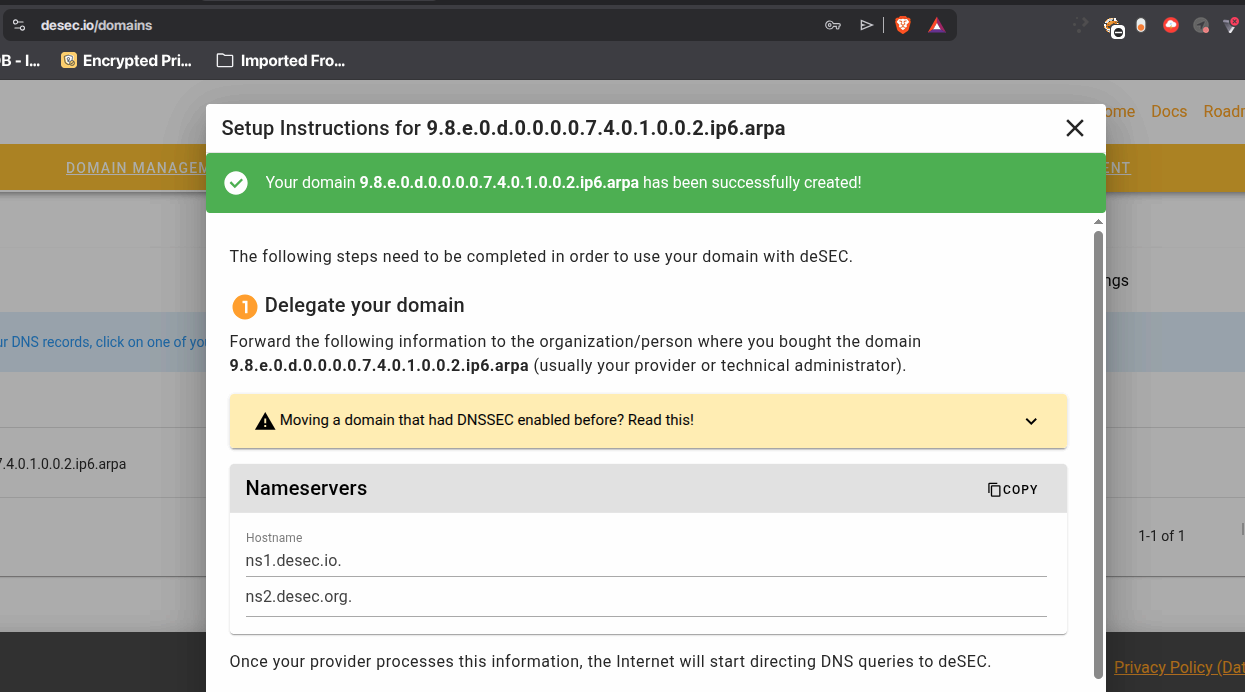
So the next step is signing up for a free deSEC account and adding your ip6.arpa address there as a domain. Once it is added, you go back to Hurricane Electric's tunnel page, find the section called "rDNS Delegations," and point it at deSEC's nameservers. This is basically telling the internet "hey, if anyone asks about this reverse DNS name, go ask deSEC, not me."
Now you need somewhere to put actual website files. A free static hosting service called Surge is a good fit here, mainly because it does not force HTTPS on you. That matters a lot for this project, because almost every certificate authority (the organizations that issue the padlock/HTTPS certificates browsers trust) refuse to issue certificates for .arpa domains, since it is officially reserved infrastructure space, not a normal public domain.
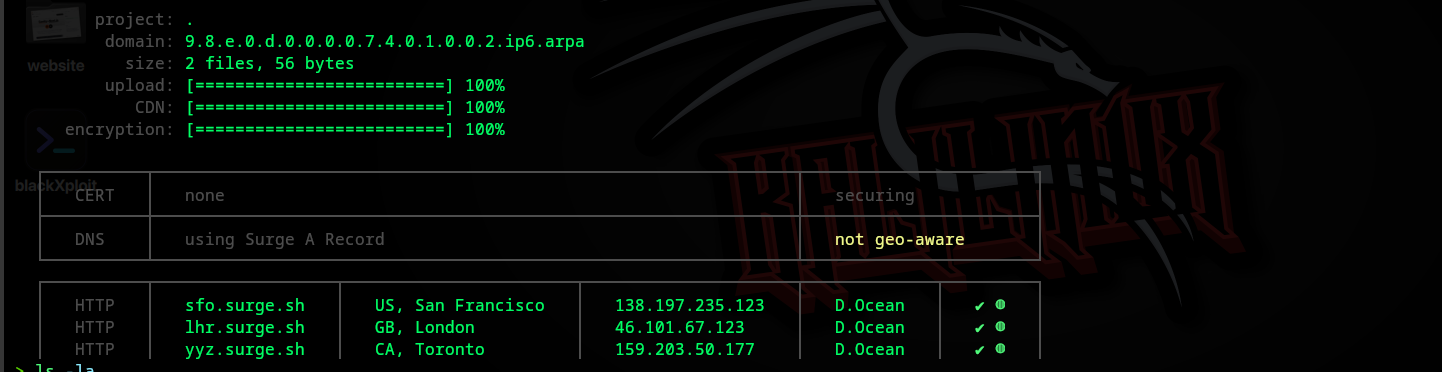
To deploy, you make a folder with at least an index.html file inside it, install Surge through npm or bun, and run something like:
bunx surge . subdomain.9.8.e.0.d.0.0.0.0.7.4.0.1.0.0.2.ip6.arpa
Here "subdomain" can be literally anything you want, it is just a label you are choosing yourself, like picking "www" or "blog" or your own name. Surge will publish your files and tell you what address to point your DNS at.
Back in deSEC, you now create a DNS record connecting your .arpa name to your Surge site. If you are using a subdomain (like subdomain.yourdomain), you create a CNAME record pointing at the surge address it gave you. If you want to use the bare domain with nothing in front of it, you cannot use a CNAME there, because a CNAME record is not allowed to exist alongside other records already present at the root, like the NS record. In that case you use an A record pointing directly at one of Surge's server IP addresses instead.
Once the DNS record is saved and has had a little time to update, your site should load. You now technically have a working website on a domain that is not supposed to be publicly available at all.
Short answer, it is genuinely difficult, and this is where things get limited. Most certificate authorities including the popular free one, Let's Encrypt, will not issue a certificate for an .arpa domain because their policies restrict issuance to registrable public domains, and .arpa does not count. Surge's own free tier also does not include HTTPS for custom domains regardless. Realistically, most people doing this experiment just accept running the site over plain HTTP without the padlock. It is possible to attempt workarounds like self-signed certificates or routing through a CDN that supports flexible SSL, but neither gives you a fully trusted, warning free HTTPS connection the way a normal domain would.
This whole idea is not brand new. There is an older, similar trick involving a different part of .arpa called e164.arpa, which is used to associate phone numbers with DNS records for a service called ENUM. In countries like Germany and the Czech Republic, individuals can actually register and control DNS entries tied to their own phone number under e164.arpa. People outside those countries cannot do that particular version, which is part of why the ip6.arpa version through Hurricane Electric became the more accessible workaround for everyone else.
This whole project does not use any secret hacking or exploit of a vulnerability, it just uses these systems slightly outside of their intended purpose, using tools that are otherwise completely legitimate and free. It is worth remembering that this is not an officially supported use case, and policies at Hurricane Electric, deSEC, or Surge could change at any time to close this loophole. But as of now, it works, and it is a genuinely fun way to learn more about how DNS, reverse lookups, and top level domains actually function under the hood.
Original guide this whole process is based on:
https://hawksley.dev/blog/get-free-arpa-domain
Wikipedia article on the .arpa domain:
https://en.wikipedia.org/wiki/.arpa
IANA's official page describing the purpose of .arpa:
https://www.iana.org/domains/arpa
MDN Web Docs glossary entry on ARPA and reverse DNS:
https://developer.mozilla.org/en-US/docs/Glossary/ARPA
Blog post explaining the e164.arpa phone number trick:
https://lina.sh/blog/hijacking-e164-arpa
Hurricane Electric's free IPv6 tunnel broker service:
https://tunnelbroker.net
deSEC free and secure DNS hosting:
https://desec.io
Surge, free static site hosting used to publish the site:
https://surge.sh